
Listeners forgive a lot. They'll forgive a stumble, a tangent, even a slightly boring middle. The one thing they won't forgive is audio that's tiring to listen to — the boxy echo of a hard room, a guest who sounds like they're calling from inside a tin, levels that lurch from a whisper to a shout. Bad audio doesn't just sound amateur; it quietly signals that the ideas might be amateur too.
Good sound is a trust signal. The good news is that broadcast-ready audio is mostly a matter of getting a few fundamentals right, in order — not of spending thousands on gear. This guide walks through the whole chain, from the room you record in to the loudness target you export at.
Key takeaways
- Quality is won at capture — a quiet, soft-furnished room and good mic technique beat any plugin.
- One decent USB or dynamic mic per person matters more than an expensive interface.
- Every stage of the signal chain can only preserve what the previous one captured.
- Edit for the ear, not the eye — pacing and clean cuts matter more than removing every breath.
- Master to around −16 LUFS (stereo), the widely recommended podcast loudness target, with true peaks under −1 dBTP.
Why audio quality is a trust signal
Human ears are unforgiving of effort. When audio is muddy, echoey, or uneven, the brain works harder to decode it — and that fatigue gets subconsciously attributed to the content, not the recording. People don't think “poor microphone technique”; they think “I'm not enjoying this” and leave.
That's why audio quality shows up directly in your analytics as consumption and retention. A clean, warm, consistent sound is the baseline that lets everything else — the ideas, the guest, the story — actually land. It's also the cheapest credibility you can buy: the fundamentals below cost far less than the audience you lose without them.
It all starts at capture
No plugin can un-echo a room. The single biggest jump in quality most shows can make is recording in a space that doesn't fight them.
Tame the room. Echo comes from sound bouncing off hard, parallel surfaces. Soft furnishings absorb it: record in a room with a carpet, curtains, a sofa, and bookshelves, and avoid bare kitchens and glass-walled offices. In a pinch, a walk-in wardrobe full of clothes is one of the best-sounding rooms in most homes.
Get the mic technique right. Speak across the mic, not straight into it, to avoid plosive pops on “p” and “b” sounds — a pop filter helps too. Keep a consistent distance, ideally a hand-span away, so your level doesn't wander. Closer is generally better: it raises your voice relative to the room, which means less echo and less background noise.
A great edit can rescue a mediocre take. It cannot rescue a bad room. Get this stage right and everything downstream becomes easier.
The gear that actually matters
Gear matters far less than the internet would have you believe, and the priorities are counter-intuitive.
The microphone is the one thing worth caring about. A dynamic microphone (the kind that rejects room sound and background noise) is far more forgiving in an untreated space than a sensitive condenser. Popular, genuinely good options run from budget USB mics to broadcast staples, and any of them will sound professional in a decent room.
Headphones, always. Everyone recording should wear closed-back headphones so no one talks over each other and so you catch problems live rather than in the edit. Crucially, avoid active noise cancelling for anything you're monitoring or editing on — ANC processes the signal, so you stop hearing what was actually recorded. This review of a popular budget ANC pair explains the problem in full, and our guide to the best headphones for podcasting compares the four pairs worth considering.
If you only want one recommendation: the Sony MDR-7506 has been the broadcast standard since 1991 and is what most of the monitoring advice below assumes you're wearing. It's flat and deliberately unflattering, which is what lets you hear the sibilance, plosives and room tone described in the sections that follow.
Don't over-invest in the interface. For most shows a simple USB microphone, or one audio interface if you've gone the dynamic-mic route, is plenty. Spending the mic budget on the interface instead is the most common gear mistake we see.
Recording remote guests? Use a tool that records each speaker on a separate local track (Riverside, Zencastr, and similar). Separate tracks let you fix one person's audio without touching the other's — the difference between a salvageable episode and a compromised one.
The signal chain, stage by stage
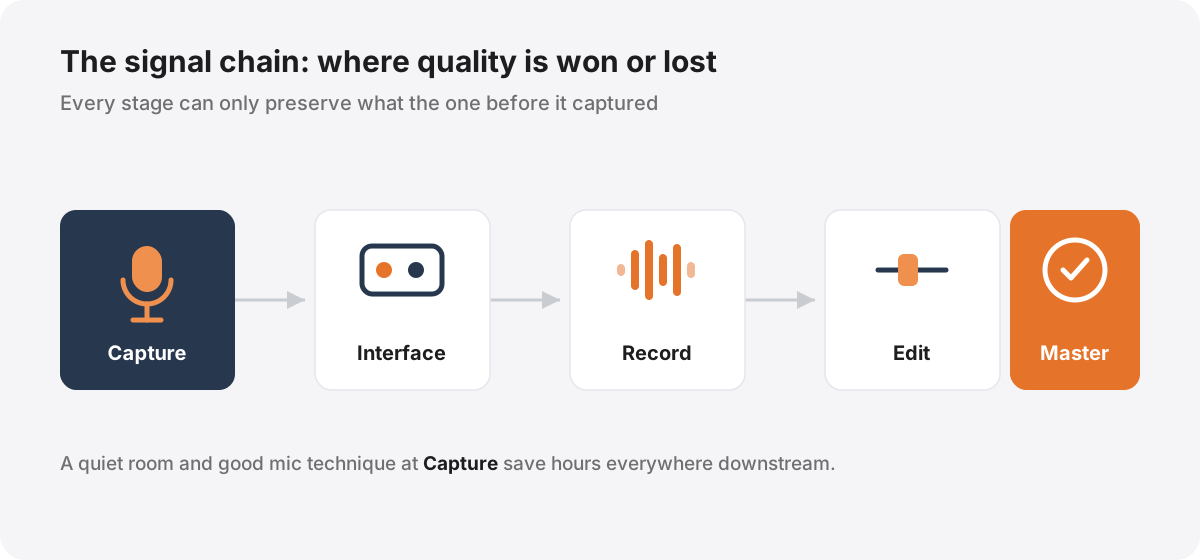
Think of your audio as passing through a chain, where each link can only preserve or degrade what it receives — never recover what was lost earlier.
Capture is the microphone and the room, as above. Interface converts the mic's signal to digital; set your input gain so peaks land comfortably below the maximum, leaving headroom, rather than pushing hot and clipping. Record into any competent DAW — the software matters less than getting clean levels into it. Edit shapes pacing and removes problems. Master brings the finished episode to a consistent, correct loudness for every platform.
The order is the lesson. A brilliant master can't fix a clipped recording; a clean capture makes every later stage almost effortless. Invest your attention front-to-back, and spend the most of it at the start.
Editing: the invisible craft
The best edits are the ones you never notice. The goal isn't to sterilise the conversation — it's to keep it moving and remove anything that pulls a listener out.
Cut for pacing. Trim the slow start, tighten long-winded setups, and lift the dead weight from the middle. Most conversations improve when the first two minutes are the tightest of the episode.
Leave it human. Resist the urge to remove every breath and “um.” A little natural texture keeps the show feeling like real people talking; a ruthlessly gated, breathless edit sounds unsettling and robotic.
Process gently and in order: clean up obvious noise, then even out the level differences between speakers so no one is dramatically louder than the other, then a light touch of EQ to add warmth or remove boxiness. Subtlety wins — if a listener can hear the processing, it's too much.
This is the stage that eats the most hours, and the one where experience shows most. It's also, not coincidentally, the part most hosts are happiest to hand off.
Loudness: the number most shows get wrong
Here's the fundamental most independent shows miss. Loudness is not measured by the peaks on a waveform — it's measured in LUFS (Loudness Units Full Scale), which model how loud audio actually feels to a human over time.
The widely recommended target for podcasts, echoed by the Audio Engineering Society's streaming loudness guidance and Apple's own specifications, is around −16 LUFS integrated for stereo files (and roughly −19 LUFS for mono), with true peaks kept under −1 dBTP to avoid distortion on playback. Hit that target and your show sits at a comfortable, consistent volume next to professional podcasts and radio — listeners never have to lunge for the volume dial between your show and the next.
Master too quiet and you sound thin and amateurish; master too loud and streaming platforms may turn you down anyway, often making you sound worse. Any competent loudness meter (many are free) will show you your integrated LUFS and true peak, and most modern editors can normalise to a target automatically. It's a five-minute step that separates shows that sound professional from shows that don't.
Common mistakes that quietly ruin good audio
Even shows with decent gear routinely lose quality to a handful of avoidable errors. Watch for these:
Recording too far from the mic. Sit back a foot or two and you invite the whole room in — echo, keyboard clicks, traffic. Close and consistent almost always wins.
Monitoring on speakers instead of headphones. Without headphones you can't hear the problems as they happen, and you risk echo bleeding between mics. Everyone wears them, every time.
Chasing loudness with a limiter. Slamming the audio to make it “louder” crushes the life out of a voice and adds distortion. Set a correct loudness target instead and let the master do the work.
Over-gating and over-processing. Aggressive noise removal leaves a voice sounding underwater and swallows the natural breaths that make speech feel human. Gentle and transparent beats heavy every time.
Ignoring the guest's setup. Your host chain can be flawless and the episode still sounds bad if the guest is on laptop speakers in a tiled bathroom. Send a one-line setup note in advance — headphones, a quiet soft room, close to the mic — and record separate tracks so you can treat their audio independently.
None of these is exotic. They're just the small, boring disciplines that separate audio that sounds handled from audio that sounds hopeful.
A quick pre-publish checklist
Before an episode goes out, run through this:
- Recorded in a soft, quiet room, mics a hand-span away, everyone on headphones.
- Each speaker on a separate track (especially for remote guests).
- Levels even between speakers; no one dramatically louder than anyone else.
- Obvious noise, clicks, and long dead air removed — but breaths and personality left in.
- The first two minutes are the tightest in the episode.
- Mastered to ≈ −16 LUFS (stereo) with true peak under −1 dBTP.
- Exported as MP3 at 128 kbps or higher for spoken word.
- Listened back end-to-end on the kind of cheap earbuds most of your audience actually uses.
Get those right and your show will sound broadcast-ready — which, for a listener deciding whether to trust you, is most of the battle. If working through that chain every week is more than you want to take on, it's exactly the work we handle for the shows we produce — and if you're weighing that up, our editing cost calculator shows what doing it yourself actually costs you in time and money.
References & further reading

Author
Shauna Martin
Head of Content Marketing
Hi, I'm Shauna — I lead content at Selected Frequencies. I spend my days pulling apart what makes a podcast worth listening to and writing it down, so you don't have to learn it all the hard way.