
Short answer: Descript and Riverside solve different problems, so the real question isn't "which one wins" — it's "which one do you need first." Riverside is the better recording tool; Descript is the better editing tool. Plenty of serious podcasters use both: record in Riverside, edit in Descript. But if you only want one, this comparison will tell you which.
Both have grown into all-in-one platforms that overlap more every year, which is exactly why the choice is confusing in 2026. Below we break them down across the things that actually matter — recording quality, the editing experience, AI features, video, and price — and end with a clear recommendation for each type of podcaster.
Key takeaways
- Riverside is recording-first: it captures broadcast-quality, separate local tracks for remote guests, up to 4K video.
- Descript is editing-first: you edit audio and video by editing a text transcript, which is transformational for beginners.
- Descript's AI (text-based editing, filler-word removal, Studio Sound) is its standout advantage.
- Riverside's local recording is the safer choice for high-stakes remote interviews.
- The most powerful workflow for many shows is to use both — record in Riverside, then edit in Descript.
The quick verdict
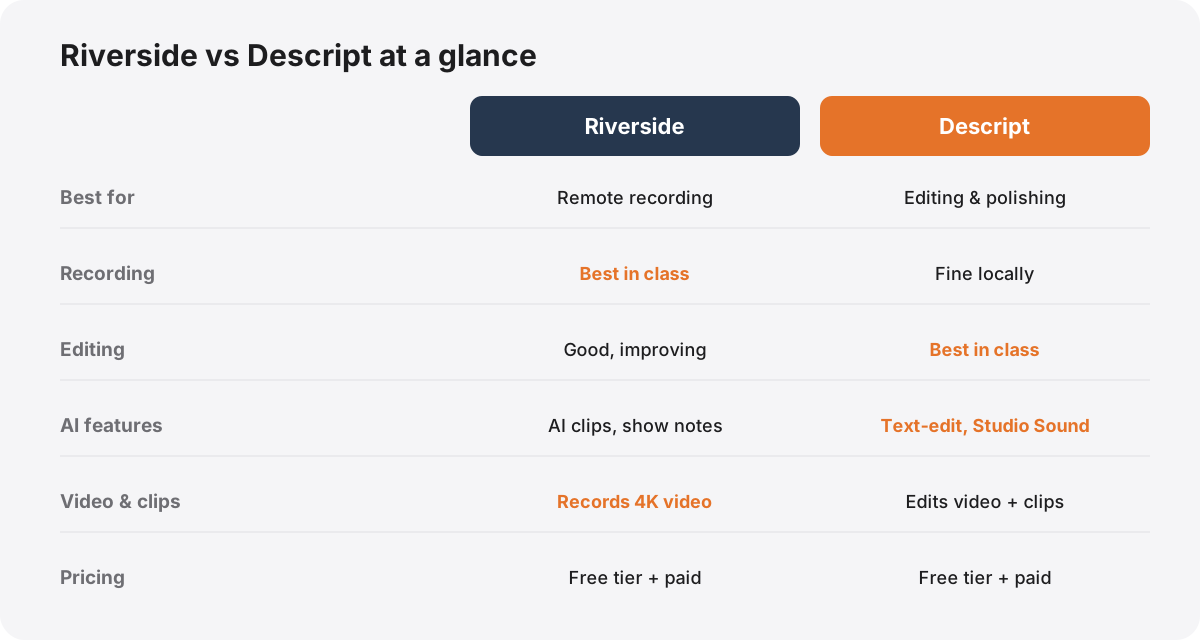
If you're short on time, here's the whole article in four lines:
- Choose Riverside if your priority is recording remote guests in the highest possible quality, especially with video.
- Choose Descript if your priority is editing quickly and easily, and you want the gentlest possible learning curve.
- Use both if you can — record in Riverside, edit in Descript. It's the workflow a lot of professional shows land on.
- Either one alone is enough to make a genuinely good podcast. You're choosing a starting point, not making an irreversible decision.
The rest of this article explains why each of those is true, so you can match the choice to how you actually work.
What Riverside is (and does best)
Riverside is, at its heart, a remote recording platform. Its defining feature is that it records each participant's audio and video locally — on their own device, in full quality — and then uploads those files afterwards, rather than capturing whatever survives a laggy internet call.
That one design decision solves the biggest problem in remote podcasting. On a normal video call, your guest's audio is compressed to survive the connection, and a dropout means lost words. Riverside sidesteps this entirely: even if the live call stutters, the recording it keeps is pristine, captured at the source. You get separate tracks for each speaker — essential for editing — plus up to 4K video.
On top of that recording core, Riverside has added a genuinely useful editor, automatic transcription, AI-generated show notes, and "clips" tools that pull short vertical videos out of an episode. It also does live streaming. But its centre of gravity — the thing it's unambiguously best at — is capturing a high-quality remote conversation you can trust.
What Descript is (and does best)
Descript approaches podcasting from the opposite end: it's an editor built around one brilliant idea. It transcribes your recording, and then you edit the audio and video by editing the text. Delete a sentence from the transcript, and it's gone from the audio. Cut a rambling tangent by selecting the words and hitting backspace.
For anyone who has stared, baffled, at a traditional audio editor's wall of waveforms, this is a revelation. Editing a podcast suddenly feels like editing a document — a skill you already have. It collapses the single biggest barrier for beginners, and it's genuinely faster even for pros doing rough cuts.
Around that core, Descript layers the features that make it a polishing powerhouse: one-click filler-word removal ("um," "uh," "you know"), Studio Sound, which uses AI to make mediocre audio sound studio-recorded, multitrack audio and video editing, screen recording, and an AI assistant that can draft edits, chapters, and clips. Descript can record too, but recording isn't its strength — editing and polishing is.
Recording: Riverside wins
For capturing a remote interview, Riverside is the clear winner, and it's not especially close. Local recording is the single most important feature in remote podcasting, because it protects you from the one thing you can't fix in the edit: audio that was never captured cleanly in the first place.
Descript can record a remote conversation, but it doesn't offer the same bulletproof, record-locally-on-every-device reliability that Riverside is built around. For a high-stakes interview with a guest you'll only get once, that reliability is worth a lot. There's no "we'll fix it in post" for a dropout that ate your guest's best answer.
If you record solo, in one room, the gap narrows — local capture matters far less when there's no internet connection between two people. But the moment a remote guest is involved, Riverside's recording is the safer, better tool. (And whichever you use, get the fundamentals right first — our audio quality guide covers the room and mic technique no software can fix.)
Editing: Descript wins
For turning a raw recording into a finished episode, Descript is the stronger tool — and this is where it genuinely changes how the work feels.
Text-based editing is the headline, but the compounding advantage is everything built on top of it. Removing filler words across a whole episode is one click instead of a hundred tiny cuts. Studio Sound rescues a guest who recorded on a bad microphone. Chapters, clips, and rough drafts can be AI-assisted. For a beginner, the difference between Descript and a traditional editor is the difference between finishing your first episode and giving up halfway through.
Riverside's built-in editor has improved a lot and is perfectly capable for straightforward cuts, especially if you want to stay in one tool. But if editing is the part you dread — and for most people it is — Descript is the one that makes it painless. It's the reason so many creators record elsewhere and import into Descript to edit.
AI features: a close fight, edge to Descript
Both tools have leaned hard into AI, and in 2026 it's a genuine part of the decision rather than a gimmick.
Descript treats AI as core to editing: text-based editing itself is AI transcription, filler-word removal is automated, Studio Sound is an AI audio model, and its assistant can draft edits, titles, chapters, and clips from a plain-English prompt. Because the AI is woven into the editing surface, it tends to feel more powerful in day-to-day use.
Riverside focuses its AI on the record-and-repurpose end: automatic transcripts, AI-written show notes, and "magic" clip generation that finds short, shareable moments and formats them vertically. That clip-finding is genuinely handy for repurposing each episode into social content.
Both are strong, and both ship new AI features constantly, so any specific list dates quickly. The honest summary: Descript's AI does more to speed up editing; Riverside's does more to speed up turning a recording into clips. Edge to Descript overall, but only because editing is where most of the time goes.
Video and short-form clips
Video is no longer optional for a growing podcast, and both tools handle it — differently.
Riverside records video, up to 4K, per participant, which matters if you want a polished multi-camera-style YouTube version or high-resolution vertical clips straight from the source footage. If video quality at capture is a priority, that's a real advantage.
Descript edits video as fluidly as it edits audio — the same text-based approach applies, so trimming a video podcast is just as easy as trimming the audio. It's excellent for cutting a long episode down and producing clips, even if the footage came from somewhere else.
Both can produce the short vertical clips that drive discovery on TikTok, Reels, and Shorts. Riverside leans toward capturing pristine footage to clip from; Descript leans toward making the clipping and captioning effortless. Which matters more depends on whether your bottleneck is footage quality or editing time.
Pricing and plans
Both Descript and Riverside follow the same broad model: a limited free tier to try the tool, then tiered monthly paid plans that unlock longer recordings, higher-quality exports, more AI usage, and features like full 4K or advanced editing. In practice the two sit in a similar mid-range for an individual creator, billed per month with a discount for paying annually.
Because both companies change pricing and repackage tiers regularly, it's not worth quoting exact figures that will be out of date by the time you read this — check each provider's current pricing page (linked in the references below) before you commit. The more useful budgeting point is this: if you decide to use both, you're paying two subscriptions, so factor that in. For many one-person shows, starting with a single tool's paid plan and adding the second only when you feel its absence is the sensible path.
So which should you choose?
Match the tool to your situation:
Choose Riverside if you regularly record remote guests and want the safest, highest-quality capture — especially with video. If your nightmare is a ruined interview, Riverside's local recording buys peace of mind that's hard to overvalue.
Choose Descript if editing is your bottleneck, you're a beginner, or you mostly record solo or in-person. The text-based workflow will save you more time and frustration than anything else on this list.
Use both if you can justify two subscriptions and want a professional pipeline: record in Riverside for bulletproof capture, then import into Descript to edit fast and polish with Studio Sound. It's the setup a lot of serious independent shows converge on for good reason.
Whichever you pick, remember the tool is the smallest part of a good podcast — concept, consistency, and sound fundamentals matter far more, and no software fixes a weak idea. If you're just getting going, our beginner's walkthrough to starting a podcast in 2026 and the interactive launch roadmap are the place to start. And if you'd rather skip the software decision entirely and hand the whole edit to someone else, that's exactly what we do.
One more thing before you pick. If you're comparing these two, you're editing your own show, and the tool is rarely what's slowing you down. Before committing to either, it's worth reading when to stop editing your own podcast, which includes the cases where you shouldn't.
References & further reading

Author
Shauna Martin
Head of Content Marketing
Hi, I'm Shauna — I lead content at Selected Frequencies. I spend my days pulling apart what makes a podcast worth listening to and writing it down, so you don't have to learn it all the hard way.