
Here's the short version: you can start a podcast in 2026 in seven steps, and launch for under £150. Nail your concept, get one decent microphone, record and edit your first episode with free software, upload it to a podcast host, and submit your feed to Apple and Spotify. That's genuinely it — the rest is refinement.
This is the full beginner walkthrough of exactly how to start a podcast in 2026, from the idea in your head to an episode people can subscribe to. We've built the whole thing into a free, tickable 9-step launch roadmap you can work through as you go — think of this article as the narrated version, with the why behind each step.
Key takeaways
- Starting a podcast in 2026 takes about seven steps and can be done for under £150.
- A sharp concept and one good microphone matter far more than expensive gear.
- Free software (Audacity, GarageBand) is all you need to record and edit episode one.
- You need a proper podcast host — it generates the RSS feed that puts you on every app.
- Video, clips, and searchable show notes are what make a 2026 podcast discoverable.
What's different about starting a podcast in 2026
The fundamentals of how to start a podcast haven't changed — but the landscape around them has, and three shifts are worth knowing before you begin.
Video is no longer optional-ish. A large and growing share of podcast consumption now happens on YouTube, and even audio-first shows benefit from a simple video version and vertical clips. You don't need a studio, but you should plan for video from day one rather than bolting it on later.
AI tools have removed the grunt work. Transcription, basic editing, show-note drafting, and clip generation are now fast and cheap. That lowers the barrier to a professional-sounding launch dramatically — the tasks that used to eat a weekend now take an hour.
Discovery is harder, so structure matters more. With more shows than ever, being found takes deliberate effort: searchable titles, transcripts, and clips. The good news is that most beginners skip this entirely, so doing it even slightly well puts you ahead. We'll come back to it in the final step (and in our full guide to podcast SEO).
Step 1: Nail your concept and format
Before any gear, get the idea right — it's the cheapest and most important decision you'll make. A vague show about "business and life" is invisible; a show with a clear promise for a specific person is magnetic.
Write a one-sentence promise: "A show that helps ___ do ___." If you can't fill both blanks, the concept isn't sharp enough yet. A tight niche always beats a broad one when you're starting from zero, because it gives a listener a reason to choose you over the thousands of general-interest shows.
Then pick a format you can sustain: solo (just you), co-hosted (you and a regular partner), or interview (you and a rotating guest). Interview shows are the most popular for a reason — they bring built-in expertise and a natural way to grow your audience — but they also add booking work. If you go that route, our guide to booking great guests covers how to fill a calendar without a big name or budget. Whatever you choose, consistency of format matters more than which one you pick.
Step 2: Name your show and make cover art
Your name and cover art are the first — often only — impression a potential listener gets in a crowded app. Both are worth an hour of real thought.
For the name, favour clarity over cleverness. A searchable name that hints at the topic will always out-perform an inside joke nobody's looking for, because it does double duty: it tells a human what the show is and helps you get found. If your name doesn't say what the show is about, make sure your subtitle does.
For the cover art, design a 3000×3000px square that's still legible as a thumbnail the size of a fingernail — because that's how most people first see it. Test your design at around 150×150px; if the title is unreadable at that size, simplify it. Canva has free, correctly-sized podcast cover templates, so this step costs nothing but time. Bold type, high contrast, and one clear focal point beat a busy, detailed image every time.
Step 3: Get the gear (and free software)
This is where beginners over-spend and over-think. You need far less than you'd guess.
One decent microphone per person. A USB microphone plugs straight into your laptop and sounds genuinely professional — skip the expensive XLR-and-interface setup for now. Popular beginner picks like the Samson Q2U or Audio-Technica ATR2100x cost £60–150 and are all you need for episode one.
Closed-back headphones, so everyone can monitor the audio and no one talks over each other.
Free recording software. Audacity (Windows/Mac) and GarageBand (Mac) are free and more than capable. Recording a remote guest? Riverside and Zencastr have free tiers that record each speaker on a separate track — a lifesaver when you edit.
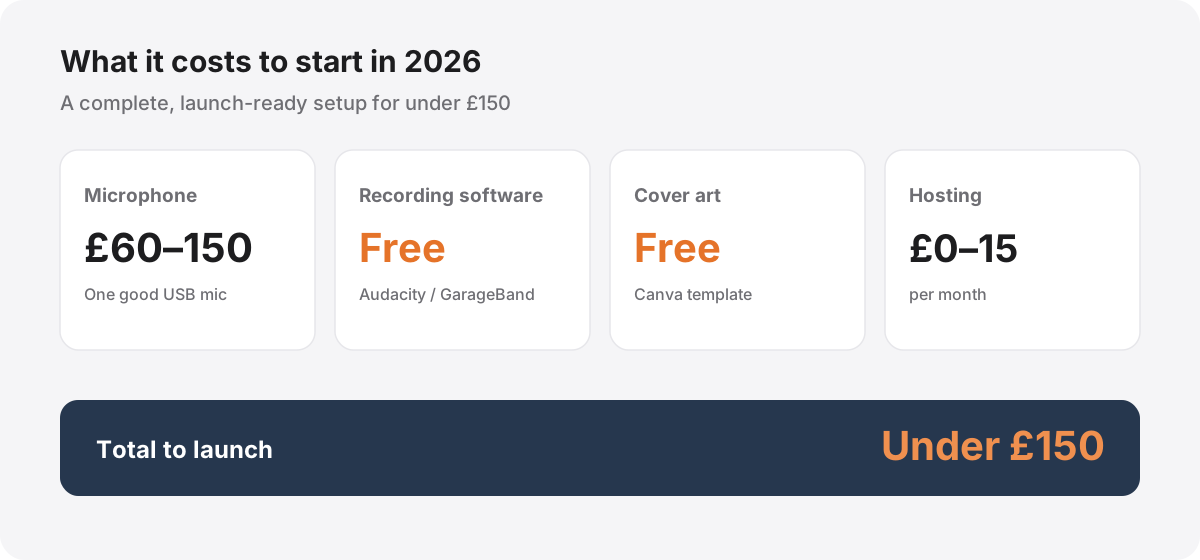
That's the whole shopping list. As the breakdown above shows, a complete, launch-ready setup comes in under £150, most of which is the microphone. Everything else — software, cover art, and even basic hosting — is free or nearly so. Getting the sound right matters more than any single piece of kit, which is why our audio quality guide is worth a read before you hit record.
Step 4: Record and edit your first episode
Now the fun part. Record in the quietest room you have — and remember that soft furnishings, not fancy gear, are what kill echo. A room with a carpet, curtains, and a sofa will sound far better than a bare office; in a pinch, a wardrobe full of clothes is one of the best-sounding spaces in most homes. Speak a hand-span from the mic, keep a consistent distance, and just get a full episode down. Done beats perfect, especially for episode one.
Then edit lightly. The goal isn't to sterilise the conversation — it's to trim the slow start, cut long pauses and major stumbles, even out the volume between speakers, and add a short intro and outro. Resist the urge to remove every breath; a little natural texture keeps the show human. Export as an MP3 at 128kbps or higher for spoken word.
Editing is the stage that eats the most time and where experience shows most, so if it becomes the thing standing between you and publishing, that's exactly the kind of work we handle for the shows we produce. Our producer's guide to broadcast-ready audio walks through the full chain — including the loudness target most beginners get wrong.
Step 5: Choose a host and publish
Here's the step that confuses most beginners: to get on Apple, Spotify, and every other app, you don't upload to those apps directly. You upload to a podcast host, which stores your audio and generates an RSS feed — the single feed that every podcast app reads from.
You need a real podcast host (Buzzsprout, Transistor, Captivate, or the genuinely-free Spotify for Creators) rather than a normal website, because that RSS feed is what distributes you everywhere. Most paid hosts run £9–15 a month; a free tier is fine to start.
Once your episode is uploaded, you submit your RSS feed once to Apple Podcasts and Spotify. They review it, and from then on every new episode you publish appears on both platforms automatically — no re-submitting. A good tip: launch with two or three episodes live rather than one, so first-time listeners have something to binge. The launch roadmap has a tickable checklist for exactly this stage so nothing gets missed.
Step 6: Get found and grow
Publishing is not the finish line — it's the start of the part that actually determines whether anyone hears your show. Three habits do most of the work.
Make it discoverable. Write searchable episode titles, publish full show notes and a transcript, and add a video version on YouTube. Audio is invisible to search engines, so this text is the only thing they can read — our podcast SEO guide covers exactly how to get found in search and AI answers.
Repurpose every episode. One recording can become a month of clips, posts, and pages. Cutting short vertical clips for TikTok, Reels, and Shorts is the single best way for new listeners to discover you — see our guide to repurposing podcast content.
Measure what matters. Ignore vanity download totals and watch consumption, seven-day reach, and follower growth instead. Our guide to the metrics that actually matter shows you which numbers to trust and which to ignore.
How long does it take — and how much?
Two questions every beginner asks, answered plainly.
Cost: you can launch for under £150. The microphone (£60–150) is the only real expense; recording software and cover art are free, and hosting is free to about £15 a month. You do not need a mixer, a soundproofed studio, or a website to start.
Time: most first-timers go from idea to published episode in one to two weeks working part-time. Planning your concept and artwork takes a few hours, recording your first episode an hour or two, and editing a beginner episode two to four hours. The one-time setup of choosing a host and submitting to directories adds a couple more hours. None of it is hard — it's just a sequence, which is exactly why we turned it into a step-by-step roadmap you can tick off as you go.
Common beginner mistakes to avoid
A few avoidable errors trip up most new podcasters. Sidestep these and you'll be ahead of the pack.
Over-investing in gear before you've made anything. A £600 setup won't fix a weak concept or a boring first episode. Start with one good mic and upgrade later, if ever.
Recording in an echoey room. No plugin can un-echo a bad space. Soft furnishings first, gear second.
Publishing one episode and stopping. Podcasting rewards consistency above almost everything. Pick a cadence you can genuinely sustain — even fortnightly — and hold it, rather than burning out on a weekly schedule after a month.
Skipping discoverability. Thin, one-line show notes and clever-but-unsearchable titles leave you invisible. A little effort here compounds for years.
Trying to do everything alone. The editing, show notes, clips, and distribution are real, repetitive work, and they're what quietly ends most shows. If you'd rather protect your time for the part only you can do — showing up and talking — that end-to-end production is exactly what we do. When you're ready to take your show seriously, start a conversation.
References & further reading

Author
Shauna Martin
Head of Content Marketing
Hi, I'm Shauna — I lead content at Selected Frequencies. I spend my days pulling apart what makes a podcast worth listening to and writing it down, so you don't have to learn it all the hard way.